


Google Business Profile AI answers are now replacing the old Q&A feature — Google shut it off and started auto-generating responses to customer questions under your business name without you ever typing a word. If you manage a Google Business Profile, this is not a “someday” item on your marketing to-do list. It is live now, and the answers your future customers see for questions like “do you have parking?” or “are you open on Sundays?” are being written by Google’s AI unless you step in and review them.
This matters because a Google Business Profile AI answer that’s wrong, outdated, or misleading looks exactly as official as one you wrote yourself. It sits right on your listing, next to your hours and reviews, and most customers will never know it wasn’t approved by a human at your business. Here’s what changed, why it happened, and exactly what to check this week.
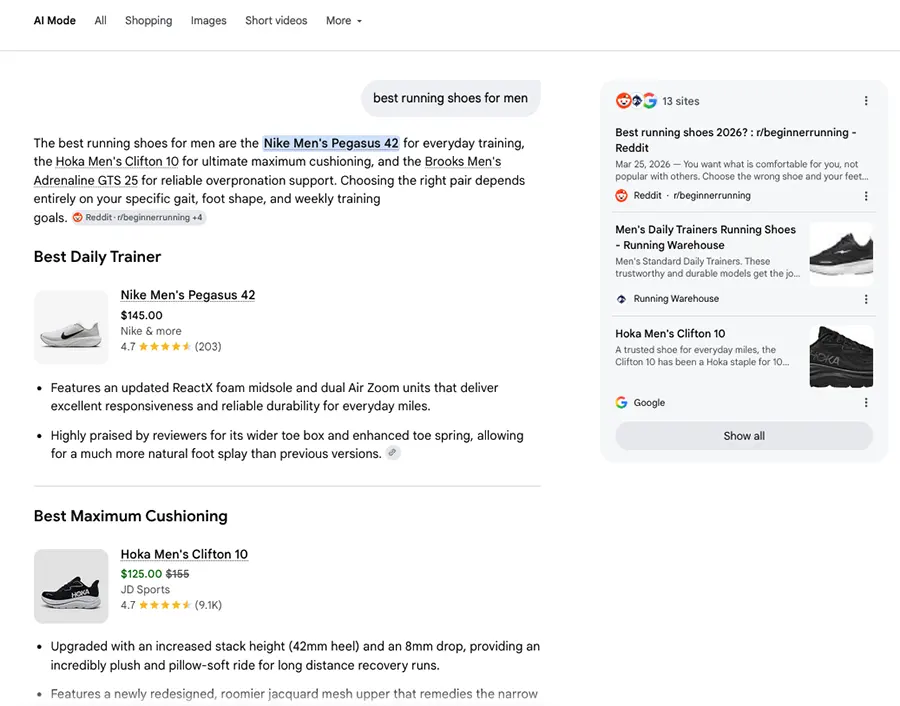
This is part of a bigger shift happening across search: Google, ChatGPT, and other AI tools are increasingly generating answers about your business on the fly instead of just linking to your website. Google Business Profile AI answers are the clearest example of that shift showing up directly on your own listing, which is exactly why it deserves five minutes of your attention now rather than a surprise later.
What Actually Changed on Your Google Business Profile
For years, the Q&A section on Google Business Profile worked like a public forum: anyone could post a question, and anyone — including strangers with no connection to your business — could post an answer. Google officially discontinued the underlying Q&A API in late 2025, and the feature has been disappearing from listings in phases ever since.
In its place, Google now uses its Gemini AI model to generate answers automatically. When a customer types a question into Search or Maps, Gemini pulls information from your Business Profile, your website, your photos, and your existing reviews to draft a response on the spot. For a well-maintained profile, this can genuinely save time. For a profile with outdated hours or a policy that changed six months ago, it can quietly publish something wrong.
The one safeguard Google added for 2026 is a review queue: AI-drafted answers now sit pending until you approve, edit, or reject them, rather than going live instantly. That queue is the single most important place to check on your Google Business Profile dashboard right now.
Why This Should Be On Your To-Do List This Week
Skipping the review queue doesn’t mean nothing happens — it means Google’s AI keeps drafting, and depending on your account settings, some answers can still reach customers with minimal oversight. A few real risks worth taking seriously:
- Stale details get repeated as fact. If your hours, parking situation, or return policy changed and your profile wasn’t updated, the AI will confidently answer with the old information.
- Nuance gets flattened. A question like “do you accept walk-ins?” might get a flat “yes” when the real answer is “yes, but we recommend booking ahead on weekends.”
- Trust is on the line. A customer who shows up based on a wrong AI-generated answer on your Google Business Profile blames your business, not Google.
The businesses that come out ahead here aren’t the ones panicking about AI — they’re the ones treating the new Google Business Profile AI answers queue like they already treat replying to reviews: a five-minute weekly habit, not a fire to put out later. Ignore Google Business Profile AI answers for a month and you’re not just risking one wrong response — you’re letting Google’s AI represent your business, unsupervised, in front of every customer who searches for you.
Old Q&A vs. New Google Business Profile AI Answers
Here’s how the retired system compares to what’s live on your profile today:
| Feature | Old Q&A (Retired) | New AI Answers (2026) |
|---|---|---|
| Who writes it | Anyone on the internet | Google’s Gemini AI |
| Source of info | Guesswork from strangers | Your profile, website, reviews, photos |
| Review before publish | No — posted instantly | Yes — sits in a queue for your approval |
| Owner control | Could flag, not edit | Can approve, edit, or reject each answer |
| Where it shows up | Q&A tab only | Search results, Maps, and your profile |
How the New Review Process Actually Works
Understanding how Google Business Profile AI answers actually get created makes the review queue much faster to manage. Here’s what happens every time a customer asks a question near your listing:
Customer Asks
A question is typed into Google Search or Maps near your listing.
Gemini Drafts
AI pulls your profile, website, and reviews to write an answer.
Queue Holds It
The draft waits in your dashboard — nothing is public yet.
You Decide
Approve, edit, or reject — only then does it go live.
What To Do This Week
- Log in and find the review queue. Open your Google Business Profile dashboard and look for pending AI-generated Q&A drafts — check weekly, not monthly.
- Fix stale info first. Update hours, parking, payment options, and policies before you touch anything else, since Gemini leans heavily on this data.
- Edit before you approve. If an answer is close but missing nuance, rewrite it in your own voice rather than rejecting it outright — Google Business Profile AI answers with an approved edit tend to stick and stop resurfacing as new drafts.
- Feed it better raw material. Add a clear FAQ section to your website and keep your Google Business Profile description current — the AI draws from both.
- Assign an owner. Whoever manages your reviews should also own this queue. It takes minutes, not hours, once it’s a habit.
Frequently Asked Questions
Is the old Google Business Profile Q&A feature completely gone?
The public Q&A tab is being phased out across profiles, and the API behind it was discontinued in late 2025. Some businesses may still see legacy questions on their listing for a while, but new questions are now routed through Google’s AI answer system instead.
Do I have to approve every AI-generated answer?
Yes, if you want control over what appears under your business name. Answers sit in the review queue until you act — but leaving them unreviewed for long stretches means outdated or awkward drafts can pile up and, in some cases, still surface to customers.
How often should I check the Google Business Profile AI answers queue?
Weekly is a reasonable minimum, tied to whenever you already check reviews. Businesses with frequent hour changes, seasonal policies, or fast-moving promotions should check more often.
Will managing Google Business Profile AI answers actually help my rankings?
Indirectly, yes. Approving accurate, well-written answers keeps customer-facing information consistent across your website, reviews, and profile — and consistency is one of the trust signals Google rewards in local search. It also reduces the odds of a bad experience turning into a negative review over something as avoidable as wrong hours.

WordPress 7.1.3 Fixes 7 Holes: Update Your Site Now
WordPress 7.1.3 Fixes 7 Holes: Update Your Site Now October 20, 2026 Web Design Table of Contents WordPress 7.1.3 fixes seven security holes, and the WordPress team says...

Can an AI Website Builder Build My Business Site?
Can an AI Website Builder Build My Business Site? September 9, 2026 Web Design Table of Contents Yes, an AI website builder can produce a working business website...

Core Web Vitals: Why Slow Sites Are Losing Rankings
Core Web Vitals 2026: Why Slow Sites Are Losing Rankings July 7, 2026 Web Design Table of Contents If your website takes more than 2.5 seconds to show...