

Table of Contents
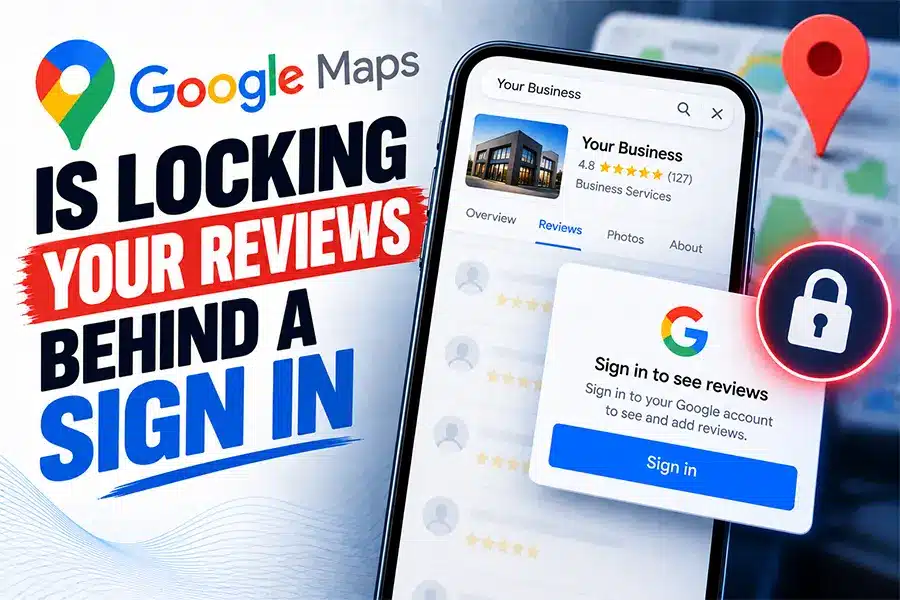
Google Maps has started asking people to sign in to a Google account before they can read all of a business’s reviews, sort them, or search through them. That means a customer checking you out on a phone who is not logged in may now see only a handful of your reviews. This Google Maps reviews sign in change was reported by several local search professionals between September 30 and October 6, 2026, and Google has not commented on it.
The honest framing matters, because it decides what you should do. This is an observed change, not an official announcement, and a similar one was reversed within days earlier this year. Below is what is confirmed, what is still unknown, and the specific checks that protect your reputation however this plays out.
Key Takeaways
- On September 30, 2026, Search Engine Roundtable reported that Google Maps now shows a sign in prompt when a visitor tries to read more reviews, sort reviews, or search within them on a Google Business Profile listing.
- The prompt tells visitors to sign in to “read and search through every review and photo,” so a signed out customer sees only a limited slice of your reviews.
- Google has not published a statement or help page about the change, so everything known comes from observations by people such as Syed Amir, Michael B. Snow and Jean-Sébastien Girard.
- Search Engine Watch reported on October 1, 2026 that the move may be aimed at stopping AI tools and bots from scraping review data.
- A near identical restriction appeared around February 18, 2026 and, according to Android Authority, was rolled back by February 23, 2026, so this one could also change quickly.
- Google’s own Business Profile help states that offering incentives for reviews is prohibited, which makes honest review requests the only safe way to build the reviews that visitors see first.
What Actually Changed on Google Maps
Until now, anyone could open a business on Google Maps, scroll through its reviews, sort them by newest or lowest rating, and search them for a word like “late” or “price.” No account needed.
According to Search Engine Roundtable’s report on Google Maps requiring a sign in to read all reviews, a signed out visitor who tries to see more reviews or change the sort order now gets a prompt reading “Sign-in to get the best of Google Maps.” The benefits Google lists include being able to “read and search through every review and photo.” Search Engine Watch described the same behavior on October 1, 2026 and noted that Google gave no explanation.
Here is what we do not know. Google has not said how many reviews a signed out visitor can still see, whether the rule applies on every device, or whether it is permanent. Treat the Google Maps reviews sign in prompt as a live test you should plan around, not a finished policy.
Why Would Google Do This?
Nobody outside Google knows for certain. The reporting points to one likely reason: review data is valuable, and AI tools have been collecting it. Search Engine Roundtable suggested the change could help prevent AI, bots and third parties from scraping Google reviews. Search Engine Watch reached the same conclusion, noting that requiring a sign in for expanded or sorted reviews limits automated collection.
A second effect is on Google’s side of the ledger. A signed in visitor can be personalized, tracked across sessions and shown saved places. That is useful to Google even if review scraping is never mentioned.
Either way, the lesson for a business owner is the same. Your reviews are an asset other companies want, and Google is deciding who gets to read them. That is why this Google Maps reviews sign in change is worth understanding even if it never reaches your customers.
Has Google Done This Before?
Yes, and it backed off. Android Authority reported in February 2026 that signed out Google Maps users could suddenly see only one photo of a location and could not read reviews. Google gave no statement. By February 23, 2026 the restriction had been rolled back.
That history cuts two ways. It may mean the current change is another experiment that disappears. It may also mean Google is testing the idea repeatedly and will eventually keep it. The smart move is to prepare for the version that stays, because preparing costs little and the downside of being caught off guard is a weaker first impression.
How Does This Change What Customers See?
Think about how a stranger actually evaluates you. They search, tap your listing, and glance at the star rating and the first few reviews. Only the curious ones scroll deeper or sort by lowest rating to look for problems. A sign in wall adds friction exactly at that moment.
The practical effect of the Google Maps reviews sign in prompt depends on what the visitor can still see without logging in:
- The few reviews that show first now carry more weight. If they are old, vague or negative, that is your impression for many visitors.
- Your overall rating and review count matter more. They are visible without effort, so they do most of the persuading.
- Owner replies become more important. A reply is part of what shows alongside each review, so thoughtful responses to the visible reviews do double duty.
- Some visitors will simply stop. Not everyone will sign in to read more. For those people, the first screen is the whole decision.
This builds on a pattern we have tracked all year. Google is already summarizing your reviews with AI, as we covered in our guide to Google’s AI review summaries, and review wording shapes which searches you appear for, which we explained in our breakdown of review keywords. Your reviews now do three jobs at once: persuade, rank and feed AI answers.

What Changed, Side by Side
| How It Works | Before the Change | With the Sign In Prompt |
|---|---|---|
| Reading more reviews | Open to anyone | Asks the visitor to sign in first |
| Sorting by newest or lowest | Available to all | Sign in required |
| Searching inside reviews | Available to all | Listed as a signed in benefit |
| What a casual visitor sees | The full story | Rating, count and the first few reviews |
| Review scraping by bots | Easier | Harder, which may be the point |
| Official Google statement | Not applicable | None published as of October 7, 2026 |
What Should You Do About It This Week?
You cannot control how the Google Maps reviews sign in rule behaves. You can control what a visitor sees first. These are the five steps we run for clients at FOG Digital Marketing in San Antonio, in order.
5 Steps to Protect Your First Impression on Google Maps
Check what a signed out visitor sees
Open your listing in a private browser window and read the first screen exactly as a stranger would.
Reply to the reviews that show first
Answer every visible review with specifics. Replies sit right under the reviews most visitors actually read.
Keep fresh reviews flowing
Recent, detailed reviews push stale or negative ones off the first screen. Ask every happy customer, every week.
Show your best proof on your own website
Feature real reviews on your service pages so visitors do not depend on Google to see them.
Recheck every two weeks
This rule may change again. A two minute check tells you whether your first screen still works for you.
Steps two and three are core Google Business Profile optimization, because the visible reviews and your replies are now part of your first impression. Step four is where your website earns its keep. When a visitor cannot read everything on Google, a site that shows real customer proof becomes the place they finish deciding, which is why a well built, carefully maintained website supports your listing instead of competing with it.
Rules for asking matter too. Google’s own Business Profile help on getting more reviews says that offering incentives to post, change or remove reviews is prohibited. Ask honestly, ask often, and never trade discounts for stars.
Why Reviews Now Matter for AI Answers Too
If the sign in rule is meant to keep scrapers out, it tells you something about where the money is. Reviews are training and answer material for AI systems. When an AI assistant recommends a plumber, a dentist or a roofer, the reviews it can read are part of the reason. Our guide to Google rewriting your business listing in its own words shows how the same review language feeds the descriptions customers read about you.
That is why we treat reviews as part of AI search optimization, not a separate reputation task. Strong, specific, recent reviews help you in three places: the Google Maps first screen, the local pack, and AI generated answers. A San Antonio SEO strategy that ignores them is leaving all three to chance, which is why our San Antonio SEO work starts with them.
Common Mistakes We See Right Now
- Panicking and deleting or disputing reviews. A sign in prompt does not change which reviews are legitimate. Only report reviews that actually violate Google’s policies.
- Assuming the Google Maps reviews sign in rule is permanent. A near identical restriction was rolled back in February 2026. Plan for either outcome instead of rebuilding everything around one test.
- Never looking at your own listing signed out. You are always logged in when you check. Your customers often are not.
- Chasing star ratings and ignoring replies. A visible review with a thoughtful owner reply persuades better than a bare five stars.
- Paying or rewarding people for reviews. Google calls it fake and misleading content. It risks suspension, and we covered how fast that can happen in our post on the Google Business Profile photo scam.
Frequently Asked Questions
Does Google Maps now require a sign in to read reviews?
For some visitors, yes. Search Engine Roundtable reported on September 30, 2026 that Google Maps prompts people to sign in before they read more reviews, sort them or search them. Google has not confirmed the details, so the exact rules may vary by device and may change.Will fewer people see my Google reviews because of this?
Possibly, because signed out visitors may see only a limited number of reviews. That is why the first reviews on your listing, your overall rating and your owner replies matter more than they did before the Google Maps reviews sign in prompt appeared.Why is Google requiring people to sign in to see reviews?
Google has not said. Search Engine Roundtable and Search Engine Watch both suggested the goal may be to stop AI tools and bots from scraping review data, which is a reasonable theory but not a confirmed reason.Has Google restricted reviews like this before?
Yes. Android Authority reported that around February 18, 2026 signed out users lost access to reviews and most photos on Google Maps, and that Google had rolled the change back by February 23, 2026. We cover how reviews shape what customers see in our guide to AI review summaries.What should a local business do about the Google Maps reviews sign in change?
Look at your listing signed out, reply to every review that appears first, collect fresh detailed reviews every week, and feature real customer proof on your website. Those four moves protect your first impression whether Google keeps the sign in rule or removes it.
Google is deciding who gets to read your reviews, and that decision can change overnight. The businesses that stay protected are the ones whose best reviews, thoughtful replies and website proof tell the same story on every screen a customer might see first.
Are Your Google Reviews Working for You?
FOG Digital Marketing audits what customers see first on your Google listing, then builds the review and website strategy that wins the call.
Our Blog
Website Design Blogs

Can an AI Website Builder Build My Business Site?
Can an AI Website Builder Build My Business Site? September 9, 2026 Web Design Table of Contents Yes, an AI website builder can produce a working business website...

Core Web Vitals 2026: Why Slow Sites Are Losing Rankings
Core Web Vitals 2026: Why Slow Sites Are Losing Rankings July 7, 2026 Web Design Table of Contents If your website takes more than 2.5 seconds to show...

ADA Website Compliance: Critical 2026 Alert for Owners
ADA Website Compliance: Critical 2026 Alert for Owners July 6, 2026 Web Design Table of Contents If your website has a broken form field, low-contrast text, or an...