

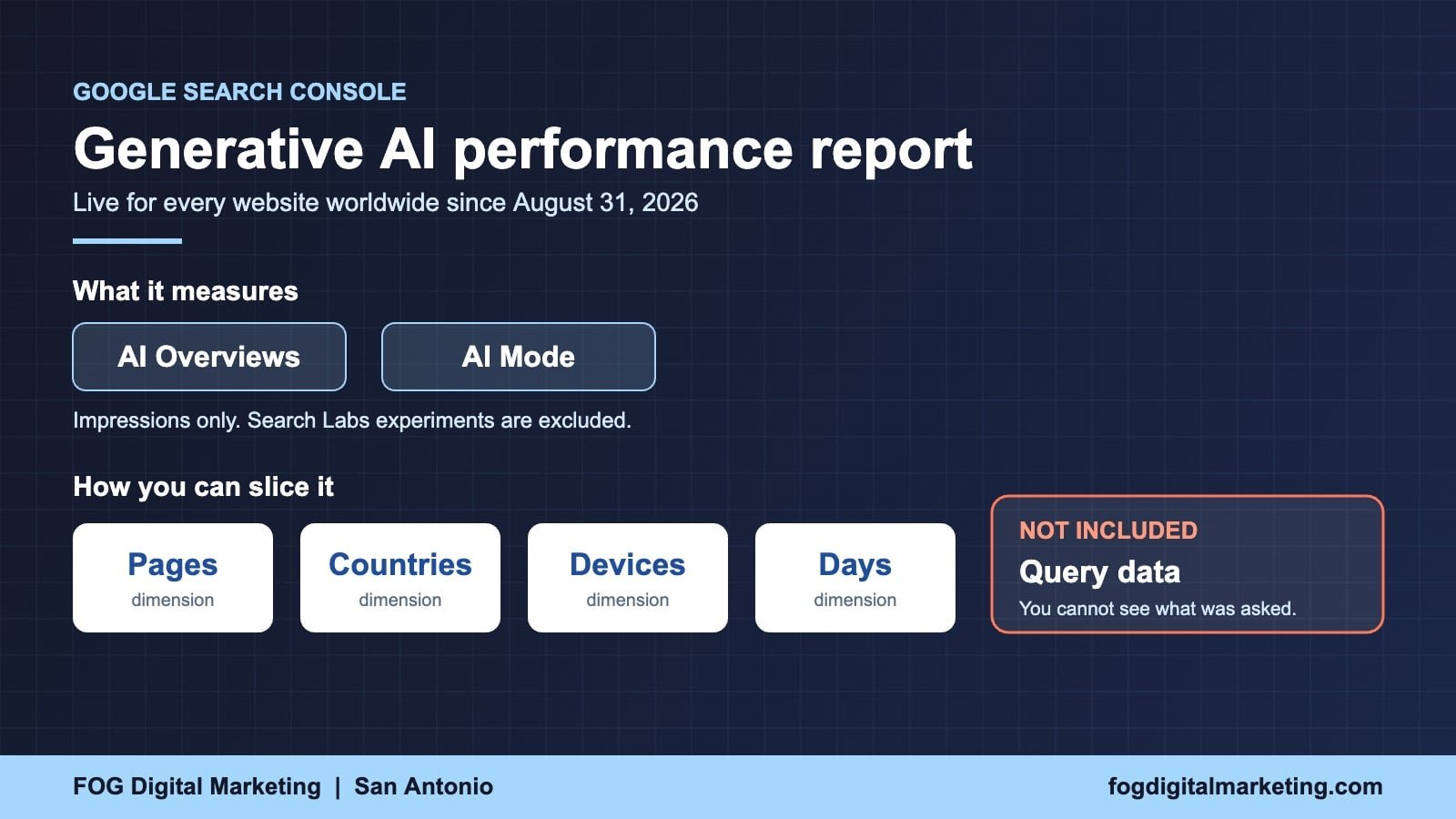
Google Search Console now shows every website owner exactly how often their pages appear inside AI Overviews and AI Mode, and the data went live for all sites worldwide on August 31, 2026. Until now you had no way to prove whether AI answers were using your business or ignoring it. The Search Console AI report closes that blind spot, and the first thing most owners discover is uncomfortable.
Here is what the report measures, what Google deliberately left out of it, and the four checks worth running on your own site this week. FOG Digital Marketing works with San Antonio business owners on exactly this problem, and the pattern we see repeat is simple: pages that hold their rankings can still bleed visits, and this report is the first place that becomes visible.
Key Takeaways
- Google confirmed in its official Search Console documentation that as of August 31, 2026, the generative AI performance report is available to all websites worldwide.
- The Search Console AI report counts impressions from two specific surfaces: AI Overviews and AI Mode. Nothing else is included yet.
- The report gives you four dimensions to slice the data: pages, countries, devices and days. There is no query dimension, so you cannot see which questions triggered your appearance.
- Google excludes Search Labs experiments from the data, so anything still in active testing will never appear in your numbers.
- Ahrefs analyzed 300,000 keywords of Search Console data and found the top ranking page loses roughly 58 percent of its click through rate when an AI answer appears above it.
- Pew Research measured clicks on organic results falling from 15 percent of visits to 8 percent when an AI summary is present, which is why rankings alone no longer predict traffic.
- Sites that opted out of Google’s generative AI features will see no data here at all, because opting out removes both the traffic and the impressions.
What Actually Changed in Search Console
Google began a phased rollout of generative AI reporting in June 2026. Most small business sites never got access during that phase. On August 31, 2026, Google updated its own help documentation with a plain statement: these insights are now rolled out to all websites worldwide.
That single line matters more than it sounds. For roughly two years, business owners have been told that AI Overviews were eating their traffic, with no instrument on their own site to confirm it. The Search Console AI report is the first measurement tool Google has handed over, and it comes directly from Google’s own logs rather than a third party estimate.
Google also shipped a separate control alongside the reporting, which lets a site owner exclude their content from generative AI features entirely. Before anyone reaches for that switch, understand the tradeoff: Google states that sites which opt out receive no traffic and no impressions from those features. You do not get to be in the answer and out of it at the same time.
What the Search Console AI Report Actually Shows You
The most useful way to understand this report is to line it up against the Performance report you already know. They look similar and they answer completely different questions.
Read that last row twice. Ranking and being cited are now two separate outcomes, and until this month you could only measure one of them. Full details of every dimension are published in Google’s official Search Console documentation for the generative AI performance report.
Why Your Rankings Can Hold While Your Traffic Falls
This is the scenario the Search Console AI report was built to explain. Your page still sits at position three. Your impressions look normal. Your visits are down by a third and nobody on your team can say why.
The mechanism is straightforward. When Google places an AI answer above the standard results, the person reads the answer and stops. Ahrefs studied 300,000 keywords of Search Console data and measured roughly a 58 percent drop in click through rate for the top ranking page when an AI answer sits above it. Pew Research measured the same behavior from the user side, with clicks on organic results falling from 15 percent of visits to 8 percent when an AI summary is present.
Neither of those numbers means your SEO failed. They mean the finish line moved. The goal is no longer only to rank on the page. It is to be the business named and linked inside the answer, which is the entire premise behind AI search optimization services. If you want the longer version of how that shift happened, we covered it when Google AI search changed how customers find you.
How To Read the Search Console AI Report in Four Steps
Your First Session With the Report
Open the report
In Search Console, go to Performance and select the Generative AI view. If nothing appears, your site has not yet earned enough AI impressions to report.
Switch to the Pages tab
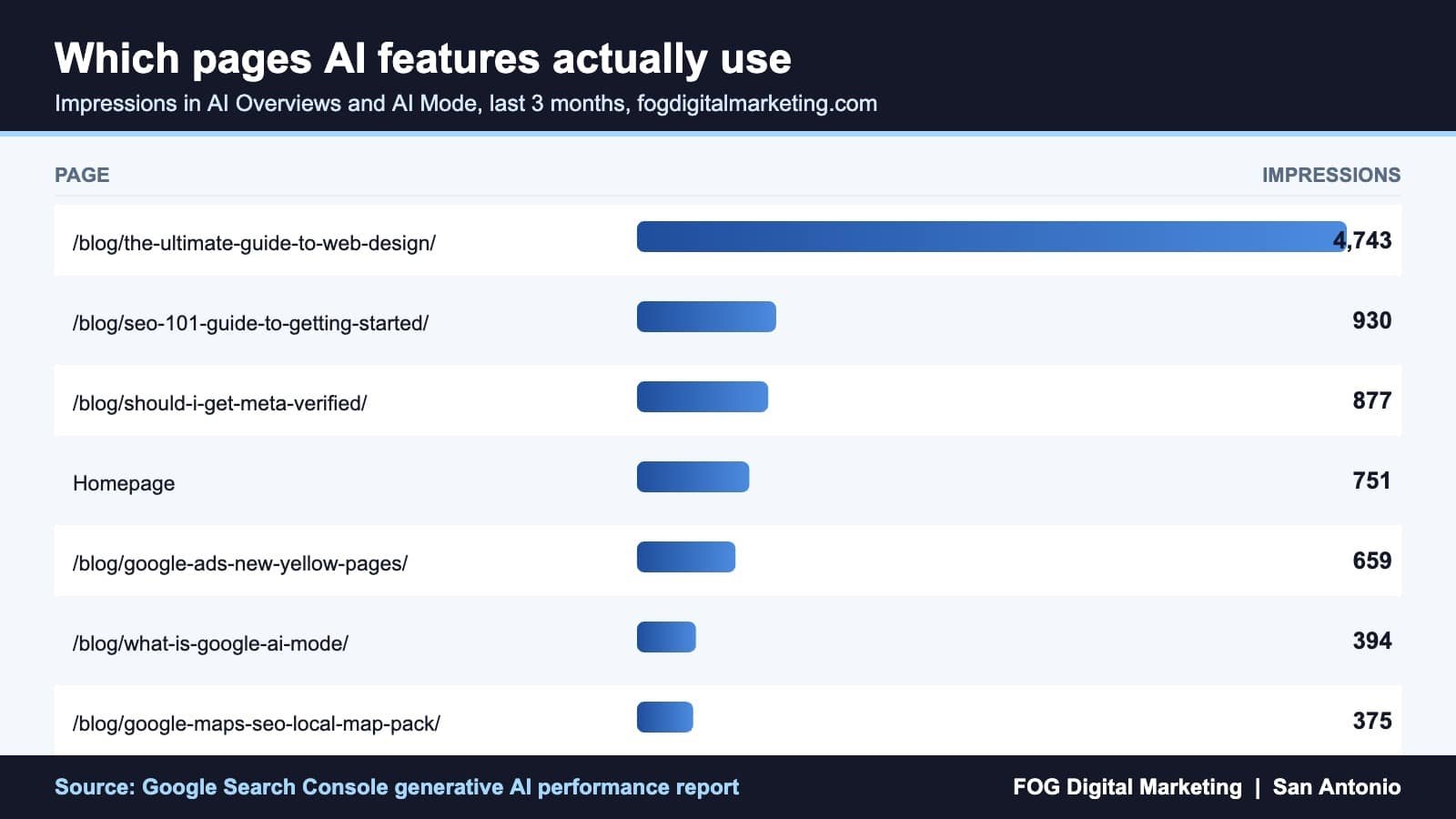
This tells you which specific URLs AI features are pulling from. Most owners are surprised by which pages win and which flagship pages never show up.
Cross reference your normal Performance report
Find pages with high AI impressions and falling clicks. Those are the pages being read but not visited, and they are your highest priority rewrites.
Export it and date it
The report has an export button. Save this month as your baseline, because you cannot prove improvement later without a starting number today.
Give that first session twenty minutes. The Search Console AI report only holds a rolling window of data, so the sooner you export a baseline, the more history you own.
What To Do About It This Week
Reading the report is step one. Turning it into recovered revenue takes four moves, and none of them require a rebuild.
- Fix the pages AI reads but does not send. If a page shows heavy AI impressions and thin clicks, the answer is being fully satisfied on the results page. Add the thing the AI cannot summarize: your pricing, your process, your local proof, your photos of real work.
- Give every page a liftable answer. AI systems extract short, complete, self contained statements. Put a direct two sentence answer near the top of each service page instead of burying it under a paragraph of throat clearing.
- Tighten the technical layer. Pages that are slow, blocked or badly structured get skipped. A quick pass through technical SEO services usually surfaces crawl and schema problems that quietly cost you citations.
- Feed the local surfaces too. AI answers for local intent lean heavily on your business profile. Reviews, categories, services and photos all feed it, which is why Google Business Profile optimization now sits upstream of your AI visibility rather than beside it.
If your site has been losing visits with no ranking drop to blame, that combination is the classic pattern our San Antonio SEO company team looks for first. We wrote about the underlying behavior in more depth in our breakdown of zero click search and how to stop losing customers.
Common Mistakes To Avoid
- Treating impressions as traffic. The Search Console AI report counts appearances, not visits. A big number here is proof of visibility, not proof of revenue.
- Opting out to protect your content. Google is explicit that excluded sites get no traffic and no impressions from generative AI features. That is not protection, it is removal.
- Expecting query data. There is no query dimension in this report. If you need to know what people asked, you have to infer it from the pages that surfaced.
- Panicking over a missing report. If you see nothing, the usual cause is simply not enough AI impressions yet, or an exclusion setting you forgot you turned on.
- Comparing your numbers to a competitor’s screenshot. This data is private to each property. Nobody outside your account can see your Search Console AI report, and you cannot see theirs.
- Waiting to export. Data windows roll off. Owners who start their baseline this month will be able to prove progress in ninety days. Everyone else will be guessing.
Frequently Asked Questions
Where do I find the Search Console AI report?
Open Google Search Console, select your property, and go to the Performance section where the generative AI performance report now sits alongside your standard Search results report. Google confirmed on August 31, 2026 that access is available to all websites worldwide, so if you have a verified property you should have the report.Does the report show clicks from AI Overviews?
The report is built around impressions, which measure how many times links to your site were shown inside a generative AI feature. It does not give you a query breakdown, and its purpose is to tell you whether AI features are surfacing your pages at all rather than to replace your standard click reporting.Why is my generative AI report empty?
The two common causes are that your site has not received enough impressions in AI features yet, or that your site has been excluded from Google’s generative AI features by a setting on your property. Check the exclusion setting first, because opting out removes both impressions and traffic.Should I block my site from AI Overviews and AI Mode?
For almost every local business the answer is no. Google states that sites which exclude themselves receive no traffic and no impressions from those surfaces, so blocking removes your chance of being the business named in the answer while your competitors stay eligible.Does a high number in the Search Console AI report mean my SEO is working?
It means AI features are finding and using your pages, which is a real win, but it is only half the picture. Pair it with your standard Performance report: high AI impressions combined with falling clicks tells you the answer is complete without you, and that page needs a reason for someone to click through.
The Bottom Line for Business Owners
For two years the honest answer to “is AI stealing my traffic” was that nobody could prove it either way. That excuse is gone. The Search Console AI report gives every owner a direct, first party measurement of how often Google’s AI features put their business in front of a customer, and it costs nothing to open.
Pull the report, export your baseline, and find the pages that are being read without being visited. Those pages are where your next customers are currently slipping away, and they are fixable once you can finally see them.

Can an AI Website Builder Build My Business Site?
Can an AI Website Builder Build My Business Site? September 9, 2026 Web Design Table of Contents Yes, an AI website builder can produce a working business website...

Core Web Vitals: Why Slow Sites Are Losing Rankings
Core Web Vitals 2026: Why Slow Sites Are Losing Rankings July 7, 2026 Web Design Table of Contents If your website takes more than 2.5 seconds to show...

ADA Website Compliance: What Business Owners Must Know
ADA Website Compliance: Critical 2026 Alert for Owners July 6, 2026 Web Design Table of Contents If your website has a broken form field, low-contrast text, or an...