

Table of Contents
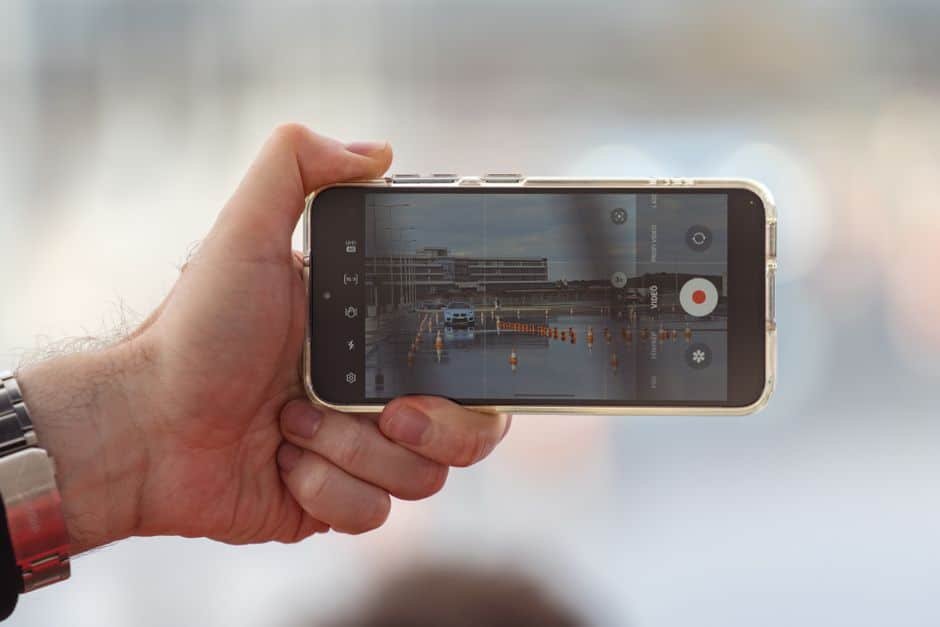
GBP video verification is now required as of July 3, 2026 — Google is requiring most small businesses to verify their Google Business Profile with a short video walkthrough instead of the old postcard — and if you don’t complete it, your listing can be suspended and disappear from Google Search and Maps entirely. This isn’t a minor form update. It’s Google’s biggest change to how it confirms a business is real, and it’s arriving at the same time Google is running its most aggressive spam crackdown yet, using AI to flag and suspend suspicious listings automatically. If your business relies on being found on Google Maps or in the local map pack, here’s exactly what changed, why it’s happening now, and what to do about it this week.
What Changed on July 3, 2026
For years, verifying a new Google Business Profile (GBP) usually meant waiting on a postcard mailed to your business address, then typing in a code. That process is being phased out. As of today, most storefront, service-area, and hybrid businesses are instead asked to record and upload a short video proving the business is real and that you’re the one running it. Google says the change is about trust. Postcards are slow, easy to game with a rented mailbox, and don’t actually prove anyone is operating a legitimate business at that location. A video — showing your signage, your workspace, and you accessing business-only tools or equipment — is much harder to fake convincingly. This applies whether you’re verifying a brand-new listing or re-verifying an existing one that Google has flagged for review. If you skip it or run out the clock, Google can temporarily suspend the listing, which means no map pack ranking, no reviews showing, and no way for customers to find you on Search or Maps until you complete verification.
Why GBP Video Verification Matters Even If You’re Already Verified
Video verification isn’t happening in isolation. It’s landing in the middle of Google’s largest local spam enforcement wave to date. A mass suspension event that started around April 27, 2026 wiped out thousands of U.S. business listings overnight, with almost no warning and no email notice. Google is now using AI detection (built on its Gemini models) to flag suspicious profiles in real time instead of waiting for a competitor to report them. The industries hit hardest so far are home services businesses: contractors, movers, and locksmiths, especially in competitive metro areas. The most common trigger has been keyword stuffing in the business name field — for example, listing your business as “ABC Plumbing Emergency 24/7 Same Day Repair San Antonio” instead of your actual registered name. Google’s system reads that as manipulation, not marketing. If your listing gets flagged for any reason — a name that doesn’t match your signage, a sudden spike in reviews, an address discrepancy — video re-verification is very likely how Google will ask you to prove you’re legitimate before restoring full visibility. Waiting until you get that notice is the wrong time to figure out how to record the video.
Exactly What Your Verification Video Needs to Show
GBP video verification has strict technical requirements, and Google is specific about this, and the specificity is the point — vague or edited videos get rejected. Your video needs to be a single, unedited recording, filmed and uploaded from a mobile device through your Business Profile, at least 30 seconds long, with no cuts, splices, or added narration. No people should be shown on camera and no voices or background conversation should be audible. Within that one continuous GBP video verification shot, Google wants to see three things:
- Location context: your permanent signage with your business name clearly visible, plus enough of the surrounding area (street signs, neighboring businesses) to confirm the location.
- Proof you operate there: something only the business owner or an employee could do, like unlocking the front door, opening a service van with your branding, or accessing a back office.
- Proof the business is real: the tools, equipment, products, or workspace you actually use — a contractor’s van full of equipment, a salon’s styling chairs, an office with your branded materials.
| What You Need to Know | Old Postcard Verification | New Video Verification (July 2026) |
|---|---|---|
| How it works | Mailed code, typed into your profile | Live-recorded video uploaded from your phone |
| Time to complete | 5–14 days for mail delivery | Minutes to record; review can take a few business days |
| Who it applies to | Mostly new listings | New listings and existing profiles flagged for re-verification |
| What it actually proves | You can receive mail at an address | You physically operate a real business at that location |
| Risk if ignored | Listing stays unverified, limited visibility | Listing can be suspended and dropped from Search and Maps |
Three Steps to Record a Video That Passes on the First Try
Start Outside, Show Your Signage
Walk up to your building while filming. Get your permanent sign, street number, and a neighboring business or street sign in frame so the address is obvious.
Prove You Operate the Business
Without stopping the recording, unlock the front door, open a branded vehicle, or badge into a back office — anything only staff could do.
Pan Across Your Tools or Workspace
Show the equipment, products, or workspace that proves what you do — a service van’s shelving, a kitchen, a salon chair, branded materials on a desk.
Common Mistakes That Get Videos Rejected
These are the most common reasons GBP video verification submissions get bounced back:
- Editing or splicing clips together. Google requires one continuous, unedited take. Stopping and restarting is treated as a cut.
- Showing people or recording audio. No faces and no voices — Google wants the location and business proof, not a testimonial.
- A business name that doesn’t match your signage. If your GBP listing name has extra keywords stuffed in (city names, service terms, “24/7”) that aren’t on your actual sign, expect the video to get flagged along with the listing.
- Filming from a desktop upload instead of your phone. Verification videos need to be recorded and uploaded directly from a mobile device through the Business Profile app or dashboard.
- A video under 30 seconds. Rushing through the walkthrough is one of the most common reasons submissions bounce back for a resubmission.
What to Do This Week
You don’t need to wait for a warning email to act. Complete your GBP video verification now: log into your Google Business Profile and check your verification status. If you see any messaging about re-verification, or if your listing was part of a recent suspension wave, treat it as urgent — every day unverified is a day you’re invisible on Maps. Even if your profile looks fine today, review your business name field for stuffed keywords and make sure it matches your actual signage exactly, since that mismatch is one of the fastest ways to get flagged under the current enforcement wave. Then film a practice walkthrough so you’re ready to submit a clean, compliant video the moment Google asks for one.
Frequently Asked Questions
Do I have to re-verify if my Google Business Profile is already active and in good standing?
Not automatically. GBP video verification is primarily required for new listings and for existing profiles Google flags for re-verification — often triggered by a name change, address change, ownership change, or suspicious activity detected by Google’s AI review system. It’s worth checking your profile’s verification status now rather than waiting to find out the hard way.
What happens if my video gets rejected?
For GBP video verification, Google will typically let you resubmit. The most common fixes are re-recording without any cuts, removing background voices, filming a few extra seconds to clear the 30-second minimum, and making sure your signage and business name match exactly.
Can an employee record the video instead of the owner?
Yes, as long as the person recording works at the business and can show the required proof — accessing business-only areas or equipment. What matters to Google is proof of operation at the location, not specifically who is holding the camera.
Don't Risk a Suspended Listing
Video verification and Google’s spam crackdown are moving fast. We’ll help you get your Google Business Profile compliant and visible before it becomes a problem.
Our Blog
Website Design Blogs
Can an AI Website Builder Build My Business Site?
Can an AI Website Builder Build My Business Site? September 9, 2026 Web Design Table of Contents Yes, an AI website builder can produce a working business website...

Core Web Vitals: Why Slow Sites Are Losing Rankings
Core Web Vitals 2026: Why Slow Sites Are Losing Rankings July 7, 2026 Web Design Table of Contents If your website takes more than 2.5 seconds to show...

ADA Website Compliance: What Business Owners Must Know
ADA Website Compliance: Critical 2026 Alert for Owners July 6, 2026 Web Design Table of Contents If your website has a broken form field, low-contrast text, or an...