

Table of Contents
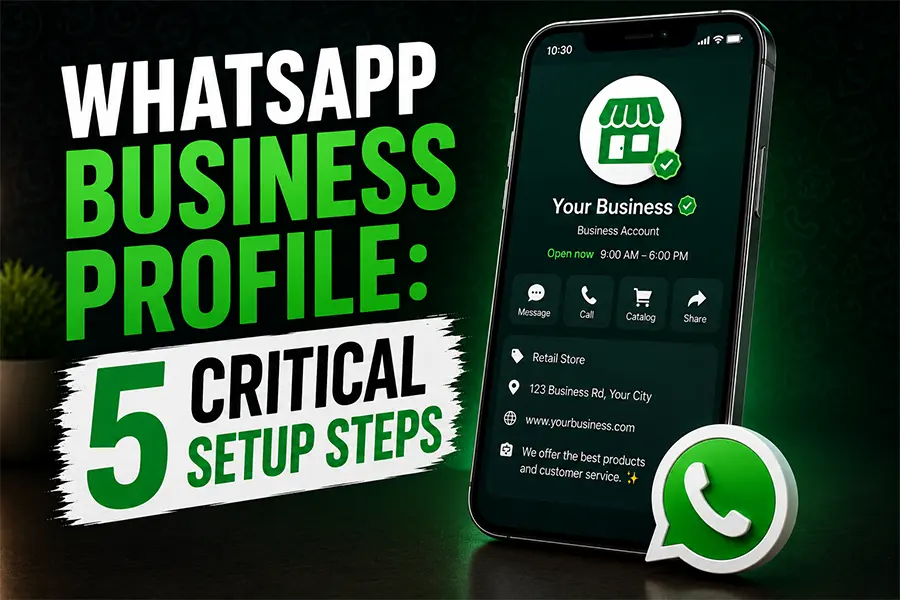
Google just gave every local business a free way to text customers again, and most owners have no idea it exists. After Google shut down its native chat feature back in 2024, businesses lost a direct messaging channel right inside their Google Business Profile. Now Google has quietly brought messaging back, this time by letting you connect WhatsApp or plain text messaging as your contact option. If you serve a market with a large Spanish speaking or international customer base, like San Antonio, this single setting change could be the fastest lead generation fix you make all year.
What the WhatsApp Business Profile Feature Actually Does
Google now allows verified business owners to add a WhatsApp or SMS text messaging option to the Contact section of their Google Business Profile. When a customer finds your business on Google Search or Google Maps, they can tap a chat icon and message you directly through WhatsApp instead of picking up the phone or filling out a contact form.
This is currently rolling out on mobile devices first, in select regions, so if you do not see the option today, check back within the next few weeks. It replaces the old native “Chat” feature Google discontinued, and unlike that shuttered tool, this one runs through an app your customers already use every day.
Setting up your WhatsApp Business Profile connection costs nothing. Google does not charge for the feature, and WhatsApp Business is free to download and use.
Why This Matters More in Bilingual and International Markets
WhatsApp is the default messaging app across much of Latin America, Europe, India, and the Middle East. For a business in San Antonio or any city with a large Hispanic, immigrant, or international customer base, this is not a nice to have. Many of your potential customers already have WhatsApp open on their phone right now, and they are far more comfortable typing a quick question there than dialing a business phone number and waiting on hold. A visible WhatsApp Business Profile option signals that you are easy to reach on their terms.
A WhatsApp Business Profile button removes a real barrier to contact. Customers who would normally scroll past a “Call Now” button because they are mid shift at work, do not want to speak English on the phone, or simply prefer texting will now message you instead of moving on to a competitor who makes it easier.
- Faster first contact: customers message the moment a question comes up instead of waiting until they can make a call.
- Lower friction for non native English speakers: typing in a second language feels easier than speaking it on the phone.
- Higher answer rates: WhatsApp messages get read and replied to faster than most business contact forms.
How to Set Up WhatsApp on Your Business Profile
You can turn this on in about five minutes if your profile is already claimed and verified. Here is the exact path.
- Open your Google Business Profile and go to Edit Profile, then Contact.
- Find the “Chat” section and select Edit.
- Click the dropdown arrow next to Chat and choose WhatsApp or Text Message.
- Enter your WhatsApp click to chat link or a phone number that accepts text messages.
- Save your changes and confirm the number matches the one tied to your WhatsApp Business account.
That last step matters. If the phone number on your Google Business Profile does not match the number registered to your WhatsApp Business account, customers will hit a broken link instead of a working chat. Double check both numbers before you move on.
Your 5 Step WhatsApp Business Profile Setup
Open Edit Profile > Contact
Select Chat, click Edit
Choose WhatsApp or Text
Enter number or link
Save and verify match
Choosing the Right Contact Channel for Your Business
WhatsApp is not a replacement for every contact method on your profile. It works best alongside your phone number and website, not instead of them. Use the table below to see how each option compares before you decide what to enable.
| Contact Channel | Cost | Best For | Response Expectation |
|---|---|---|---|
| Phone Call | Free | Urgent requests, quotes, bookings | Immediate, during business hours |
| WhatsApp Business Profile | Free | Bilingual customers, quick questions, photos of a job site | Within a few hours |
| Text Message (SMS) | Free to set up (carrier rates may apply) | Customers without WhatsApp installed | Within a few hours |
| Website Contact Form | Free | Detailed requests, project details, attachments | Same business day |
What to Watch Once You Turn It On
Adding a WhatsApp Business Profile button is only useful if someone is actually watching it. Assign one staff member to check it daily, the same way you would a phone line. A message that sits unanswered for two days does more damage to customer trust than not offering the option at all.
A few practical guardrails worth putting in place before launch, so your WhatsApp Business Profile connection stays reliable.
- Set up the WhatsApp Business app (not personal WhatsApp) so you get a business profile, auto reply, and away message.
- Write a short auto reply confirming you received the message and giving a realistic response time.
- Check the number match between your Google Business Profile and WhatsApp Business account monthly, since a re verification or number change can quietly break the link.
- Train whoever answers to keep replies short and move detailed conversations to a call or the website when needed.
Frequently Asked Questions
1. Does adding WhatsApp to my Google Business Profile cost anything?
No. Google does not charge to enable the WhatsApp Business Profile contact option, and the WhatsApp Business app itself is free to download and use. The only cost would come from your own phone plan or data usage.
2. Why don’t I see the WhatsApp option on my profile yet?
Google is rolling the WhatsApp Business Profile option out gradually, starting with mobile devices in select regions. If it is not available on your profile today, check again in a few weeks, since availability is expanding over time.
3. Can I use text messaging instead of WhatsApp?
Yes. In the same Contact and Chat settings, you can choose Text Message instead of WhatsApp and enter a phone number that accepts SMS. This is a good option if a large share of your customers do not have WhatsApp installed.
The bigger picture here is simple. Google keeps handing local businesses free ways to lower the barrier between “found you online” and “actually talked to you.” A WhatsApp Business Profile button is one of the easiest wins available right now, especially if your customer base skips phone calls in favor of a quick message. Turn it on this week, assign someone to monitor it, and you will start capturing leads that used to scroll right past your listing.
Ready to Turn More Searches Into Real Conversations?
FOG Digital Marketing helps San Antonio businesses set up and manage the contact channels that actually turn local searches into paying customers.
Our Blog
Website Design Blogs
Can an AI Website Builder Build My Business Site?
Can an AI Website Builder Build My Business Site? September 9, 2026 Web Design Table of Contents Yes, an AI website builder can produce a working business website...

Core Web Vitals 2026: Why Slow Sites Are Losing Rankings
Core Web Vitals 2026: Why Slow Sites Are Losing Rankings July 7, 2026 Web Design Table of Contents If your website takes more than 2.5 seconds to show...

ADA Website Compliance: Critical 2026 Alert for Owners
ADA Website Compliance: Critical 2026 Alert for Owners July 6, 2026 Web Design Table of Contents If your website has a broken form field, low-contrast text, or an...