Key Takeaways
- Google AI Mode is a conversational search experience, allowing users to ask complex questions, get AI-generated answers, and continue with follow-up questions without starting over.
- AI Mode is different from AI Overviews. AI Overviews summarize search results, while AI Mode functions more like an interactive AI research assistant inside Google Search.
- Access depends on eligibility and rollout. Users can access Google AI Mode through Google Search, the Google app, or google.com/ai if the feature is available in their region and account.
- Businesses should prepare for fewer informational clicks. As AI answers more questions directly, websites relying only on generic informational traffic may see lower organic CTR.
- SEO is evolving toward AI visibility. Clear structure, direct answers, FAQ content, schema markup, topical authority, and original expertise are becoming more important for visibility in Google and AI-powered search.
What Is Google AI Mode?
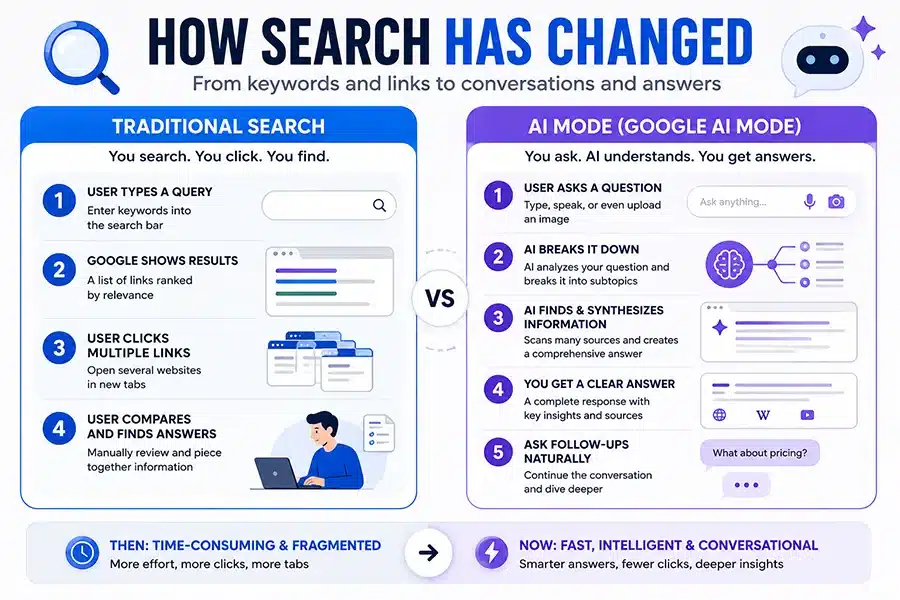
Google AI Mode is Google’s conversational AI search experience built directly into Google Search. Instead of typing a query, scanning 10 blue links, opening multiple tabs, and piecing together an answer yourself, AI Mode generates a synthesized response while still linking to sources across the web.
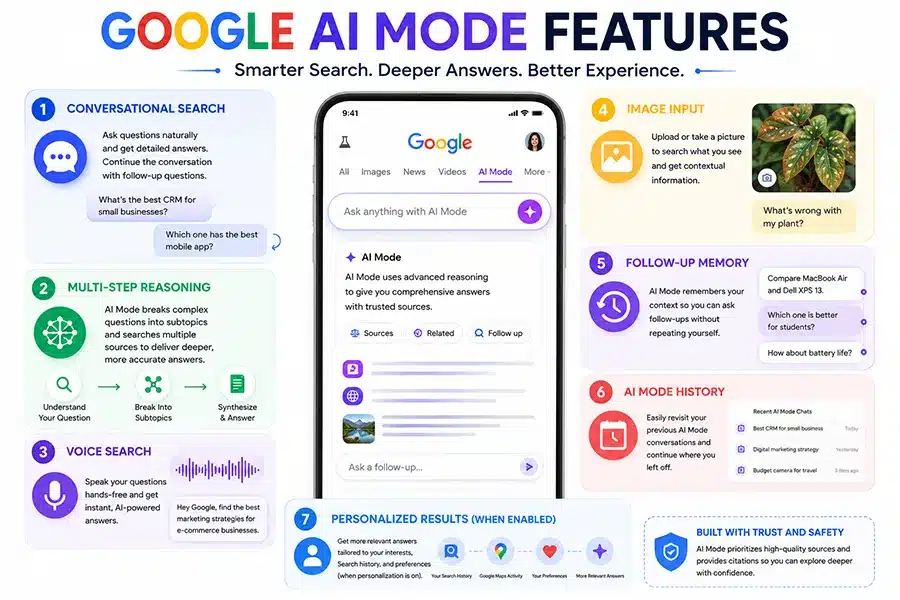
Google describes AI Mode as its most advanced AI search experience because it goes beyond standard search summaries by allowing:
- Follow-up questions
- Multi-step reasoning
- Voice input
- Image-based search prompts
- Deeper research paths
- Personalized context (when enabled)
In simple terms:
Traditional Google Search = search engine
Google AI Overviews = AI summary layer on top of search
Google AI Mode = conversational AI search assistant inside Google
Google AI Mode uses Gemini-powered reasoning and breaks complex questions into multiple sub-searches to produce broader answers
Why Google AI Mode Matters for Businesses, SEO, and Content Creators
This is not just a product update.
This changes how users interact with search.
Previously, a user searching:
“Best CRM for a 10-person HVAC company”
would:
- open review sites
- compare vendors
- visit blogs
- watch videos
Now, AI Mode may summarize the answer instantly.
That means:
✅ fewer traditional clicks
✅ more AI-mediated discovery
✅ higher importance of authoritative content
✅ stronger need for structured content AI can parse
This is exactly why SEO is shifting toward AEO (Answer Engine Optimization).
Quick Visual: How Search Has Changed
How to Access Google AI Mode
Google currently allows access in supported regions and eligible accounts.
Official access methods include:
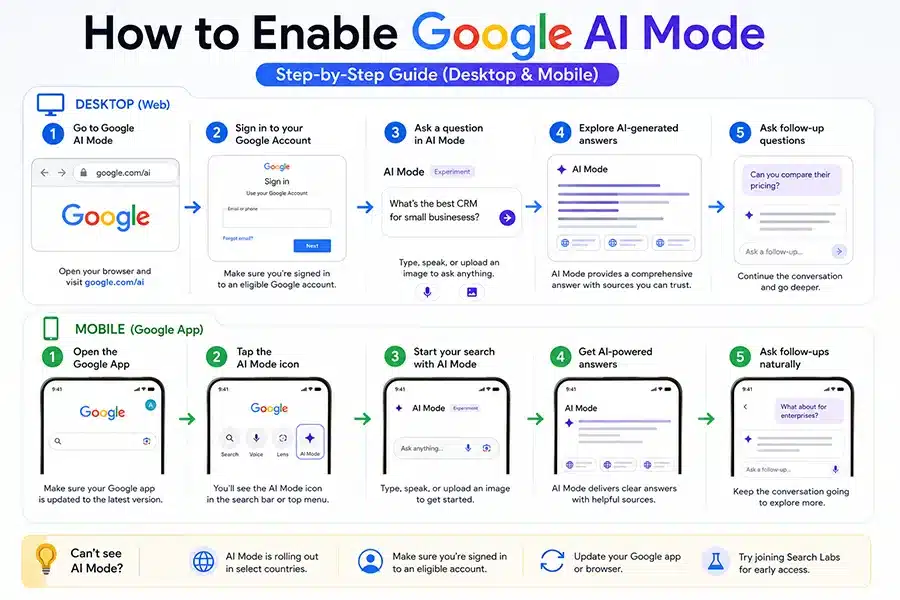
1. Direct URL
Visit:
google.com/ai
This is often the fastest route.
2. Google Search Results Page
Search normally in Google.
If AI Mode is available for your account, you’ll see an AI Mode option near search filters.
Example:
- All
- Images
- News
- Shopping
- AI Mode
3. Google Mobile App
Open the Google app.
If eligible:
- tap the AI Mode icon
- begin searching with AI responses
Google officially supports text, voice, and image input.
Google AI Mode Access Rules
This is where many people get confused.
Availability depends on several factors.
General Eligibility
Google AI Mode availability depends on:
- your country
- language support
- account eligibility
- feature rollout status
- device/platform support
Search Labs Access
For experimental features:
Google Search Labs may offer AI Mode access.
Requirements may include:
- supported region
- supported Google account
- age eligibility
Google notes Search Labs AI Mode experiments may require age minimums (13+ or 18+ depending on feature version).
Personalization Features
Some personalization features require:
- age 18+
- U.S. account
- Search personalization enabled
- Web & App Activity enabled
Without this, AI Mode still works—but without personalized recommendatio
How to Enable Google AI Mode (Step by Step)
Google AI Mode vs AI Overviews
| Feature |
AI Overviews |
AI Mode |
| Appears Automatically |
Yes |
No |
| Conversational Follow-Ups |
Limited |
Yes |
| Deep Reasoning |
Basic |
Advanced |
| Voice Search |
Limited |
Yes |
| Image Input |
Limited |
Yes |
| Research-Style Exploration |
No |
Yes |
Simple Explanation
AI Overviews
AI Overviews are generated summaries inserted into normal Google search results.
They help answer quick questions.
Example:
“How long does SEO take?”
Google may show a summary before organic listings.
AI Mode
AI Mode behaves more like a research assistant.
Example:
“Compare SEO agencies for contractors in Texas and explain pricing differences.”
That requires:
- reasoning
- synthesis
- follow-up interaction
That’s AI Mode territory.
Google explicitly says AI Mode expands what AI Overviews can do.
Google AI Mode Features
Business Implications of Google AI Mode
If your business depends on organic traffic, this matters.
Potential Risks
Lower CTR
If AI answers the question directly:
users may not click.
Fewer Informational Clicks
Top-of-funnel blogs may lose traffic.
Examples:
- what is SEO
- what is PPC
- how does CRM work
Content Commoditization
Generic articles become easier for AI to summarize.
Weak content becomes invisible.
Opportunities
Stronger Authority Wins
AI prefers:
- credible sources
- expert content
- structured answers
- original insight
Better FAQ Formatting Helps
AI can parse:
- direct answers
- bullet lists
- definitions
- comparison tables
Local Businesses Still Matter
For service businesses:
- plumbers
- HVAC
- attorneys
- contractors
AI still needs:
- location relevance
- reviews
- authority
- business data
What Google AI Mode Means for SEO
SEO is not dead.
Lazy SEO is.
Winning content now needs:
Clear Question-Based Structure
Bad:
“Everything About Digital Marketing”
Better:
“What Does SEO Cost for a Local Business?”
Direct Answers Early
AI extracts concise answers faster.
Expert Signals
Include:
- author expertise
- first-hand experience
- real examples
- citations
- updated data
Structured Formatting
Use:
- H2/H3 headings
- FAQ sections
- bullet points
- HTML tables
- schema markup
Unique Perspective
AI can summarize generic content.
It struggles to replace original insight.
FAQs
1. Is Google AI Mode free?
Core access is generally free where available.
Some advanced capabilities may tie into paid Google AI subscriptions.
2. Is Google AI Mode available everywhere?
No.
Availability depends on rollout and country support.
3. Does AI Mode replace Google Search?
No.
It complements traditional search.
4. Is AI Mode the same as Gemini?
No.
Gemini is Google’s AI model/platform.
AI Mode is a search experience powered by Google AI technologies.
5. Can businesses optimize for AI Mode?
Yes.
Best practices include:
- structured content
- FAQs
- schema
- authoritative writing
- strong brand signals
- accurate business profiles
Final Take
Google AI Mode is not a minor search update.
It changes:
- how users search
- how content gets discovered
- how businesses earn clicks
The websites that will win are not the ones producing more content.
They’re the ones producing:
clearer, more trustworthy, better-structured content that AI can confidently reference.